10 min read
Where Is the Agent Hub?
I spent three days trying to connect my AI agent to a project management tool. Not because the tool was bad — but because their authentication system was designed for web apps, not for an AI running in my terminal. This is the broken auth layer nobody wants to talk about.
In CLI is all you need, I posit that APIs are the staff entrance — the direct route to getting things done while everyone else clicks through the lobby. What I didn't mention: getting the key to that staff entrance still requires a PhD in OAuth.
I spent three days last month trying to connect my AI agent to a project management tool. Three days. Not because the tool was bad — it's actually great — but because their authentication system was designed for web apps, not for an AI running in my terminal. Even devs can't figure it out — how are the rest of us supposed to?
Writing an MCP service as a developer is so incredibly frustrating right now. The number of hours I have spent trying to get a bare bones MCP service with auth running on major providers (claude desktop, claude code, vs code, cursor, windsurf, cline, chatgpt) is downright…
— Jeff Escalante (@jescalan) July 25, 2025
That tweet captures it perfectly. MCP (Model Context Protocol) has given us a beautiful standard for how agents talk to tools. But it punted on the hardest part: how do you actually get access?
Every MCP server I try has a different auth story. Environment variables for some. API keys for others. Full OAuth flows for the enterprise ones. And OAuth in 2026 is still — somehow, impossibly — a nightmare.
The Key Problem
Here's what's broken: MCP standardizes the agent side of the equation. How to list tools, how to call them, how to get results back. Beautiful. But the authentication side? Every app implements it differently.
- OAuth flows that require redirect URIs (which CLI apps don't have)
- API keys buried in developer portals
- Service accounts that need admin approval
- JWTs with refresh tokens that expire at inconvenient moments
The friction isn't the CLI. The friction is the integration layer.
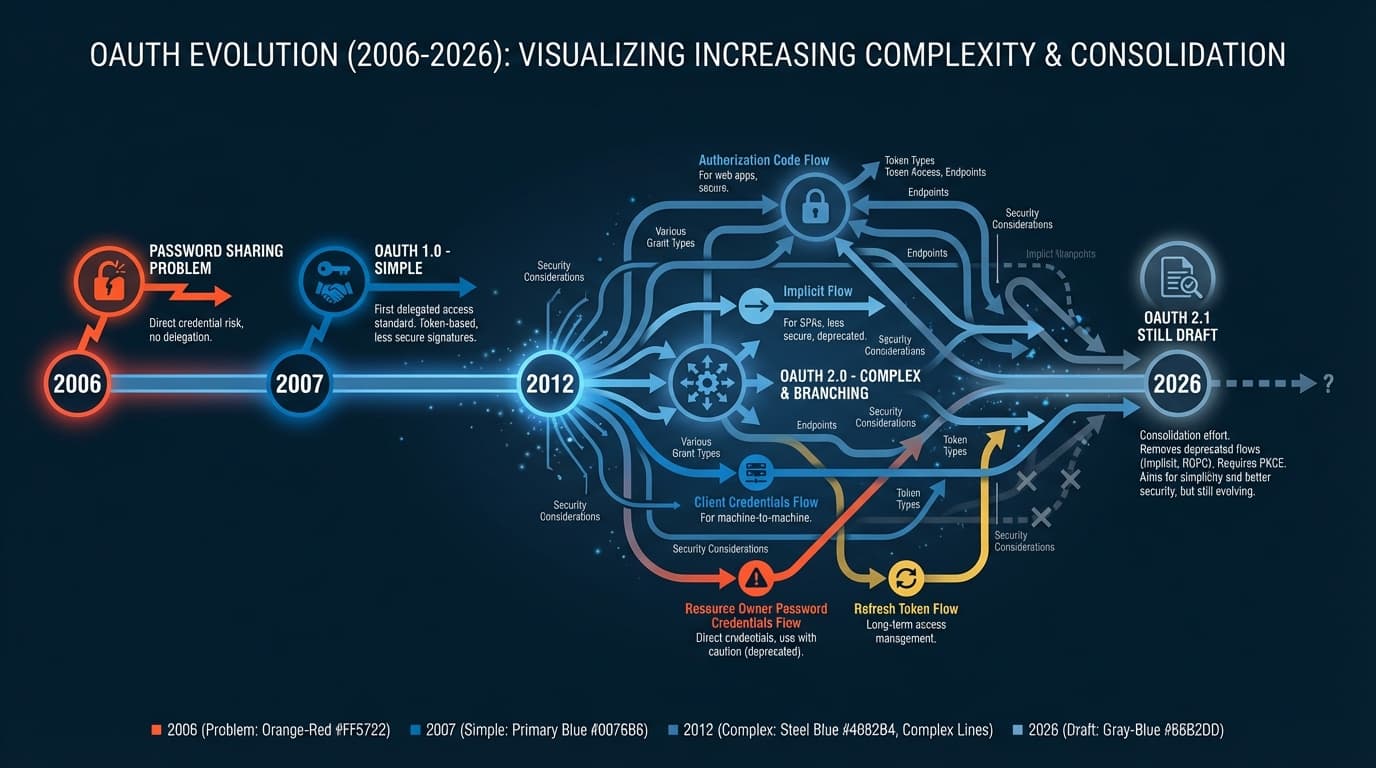
OAuth 2.0 was released in 2012. OAuth 2.1 is still a draft specification in 2026 — fourteen years later. That's how hard auth is. And developers feel it: research shows teams budget three to five days just for authentication setup when building integrations. That's before writing a single line of actual business logic.
A Quick Primer: How Agents Connect to Tools
Before diving deeper, let's clarify some terms.
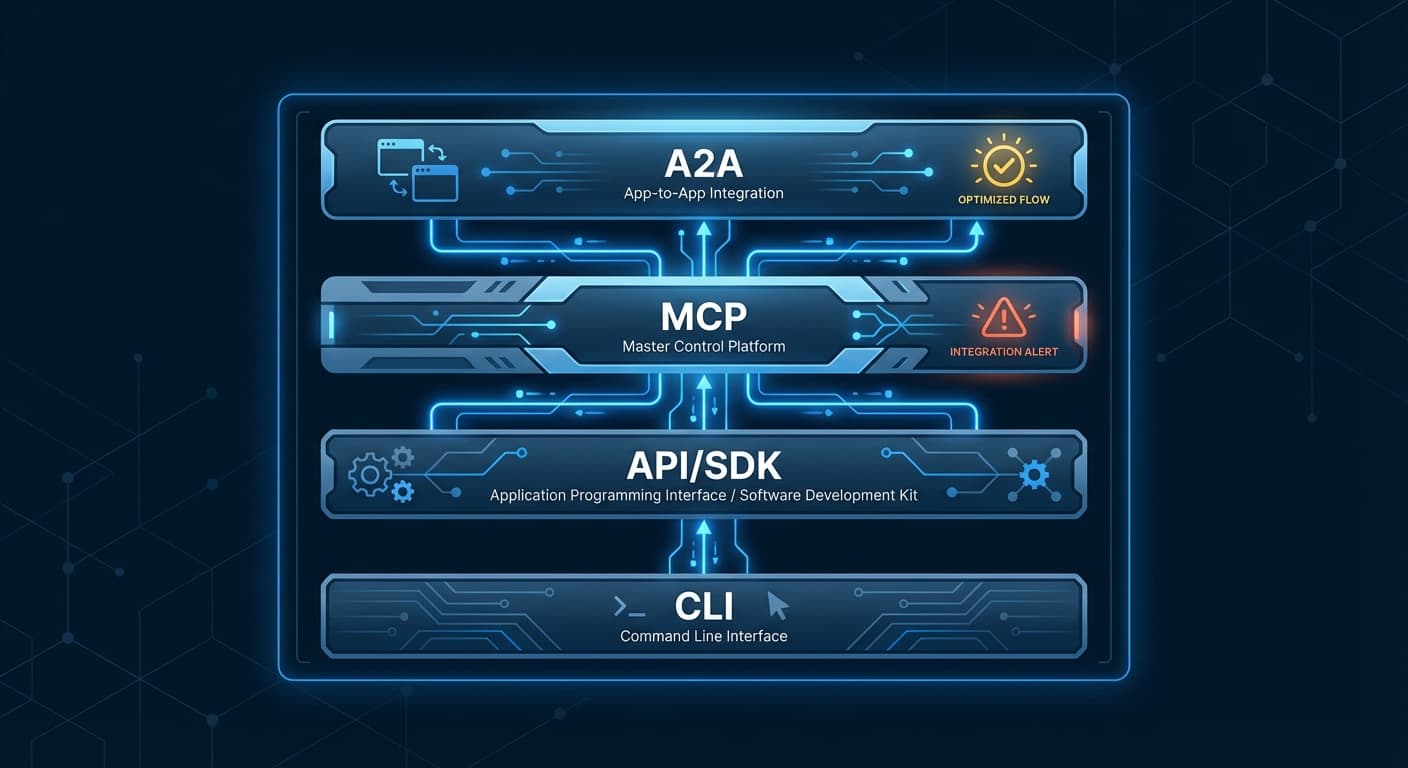
CLI (Command-Line Interface): A program you run in your terminal. git, npm, gh — these are CLIs. AI coding agents like Claude Code and Cursor run in terminals and call CLIs to do things. The CLI handles auth, usually via environment variables or config files.
API/SDK: A programmatic interface for talking to a service. Instead of clicking buttons in Stripe's dashboard, you call stripe.charges.create(). SDKs are language-specific wrappers around APIs. Both require authentication — typically an API key or OAuth token.
MCP (Model Context Protocol): A standard for how AI agents discover and call tools. Think of it as a universal adapter — instead of each agent implementing custom integrations with every service, MCP standardizes the "how do I list available tools?" and "how do I call this tool?" parts. What MCP doesn't standardize: authentication.
A2A (Agent-to-Agent): An emerging pattern where AI agents communicate with each other. One agent delegates tasks to another, passes context, receives results. Still early days, but relevant because it compounds the auth problem — now you need auth between agents, not just agent-to-service.
Here's the key insight: once you have valid credentials, all four of these can work. CLIs read your API key from an environment variable. SDKs pass it in headers. MCP servers expect it configured somehow. A2A protocols need tokens for both parties.
Auth is the gating factor. Everything else flows from there.
Why Is Auth So Hard?
Here's some history that explains how we got here.
In 2006, developers faced a problem: users wanted to connect apps together, but the only way to do it was to share their actual password. OAuth was invented to fix this — a way to grant limited access without sharing credentials. Good idea. But then something happened.
The web got complex. Mobile apps. Single-page apps. Microservices. Each new paradigm added new requirements to the spec. By the time OAuth 2.0 was finalized in 2012, it had become a framework rather than a protocol — too flexible, too many options, too many ways to implement it wrong.
Meanwhile, application security evolved in a particular direction: trapping data inside applications. Every SaaS became a walled garden. Your data lived in Salesforce, or Slack, or Notion — but getting it out programmatically? That required developer credentials, API applications, admin approvals.
This made sense in an era when "API access" meant "a developer building an integration." But it makes less sense now, when the user is the integration — when you want your AI agent to read your own calendar, access your own documents, send messages as yourself.
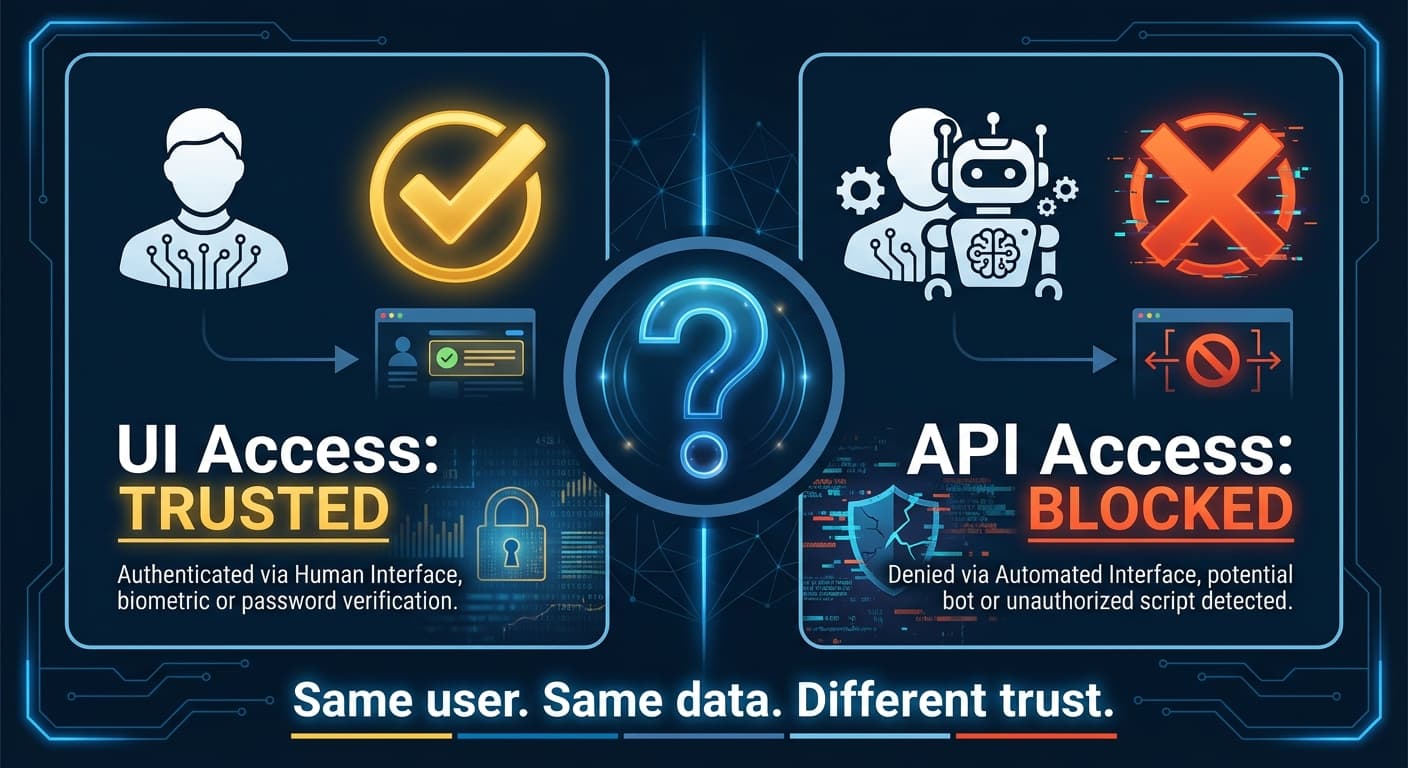
Think about it: your company trusts you with the UI. They gave you login credentials. They let you click buttons that move money, delete data, send communications. But give you an API key to let an AI assistant do the same things? Suddenly that requires a developer portal, OAuth scopes, admin consent.
The security model assumes API access is more dangerous than UI access. That may have been true when APIs were for developers building applications. It's not obviously true when APIs are for users augmenting their own workflows with AI.
What an Agent Hub Should Look Like
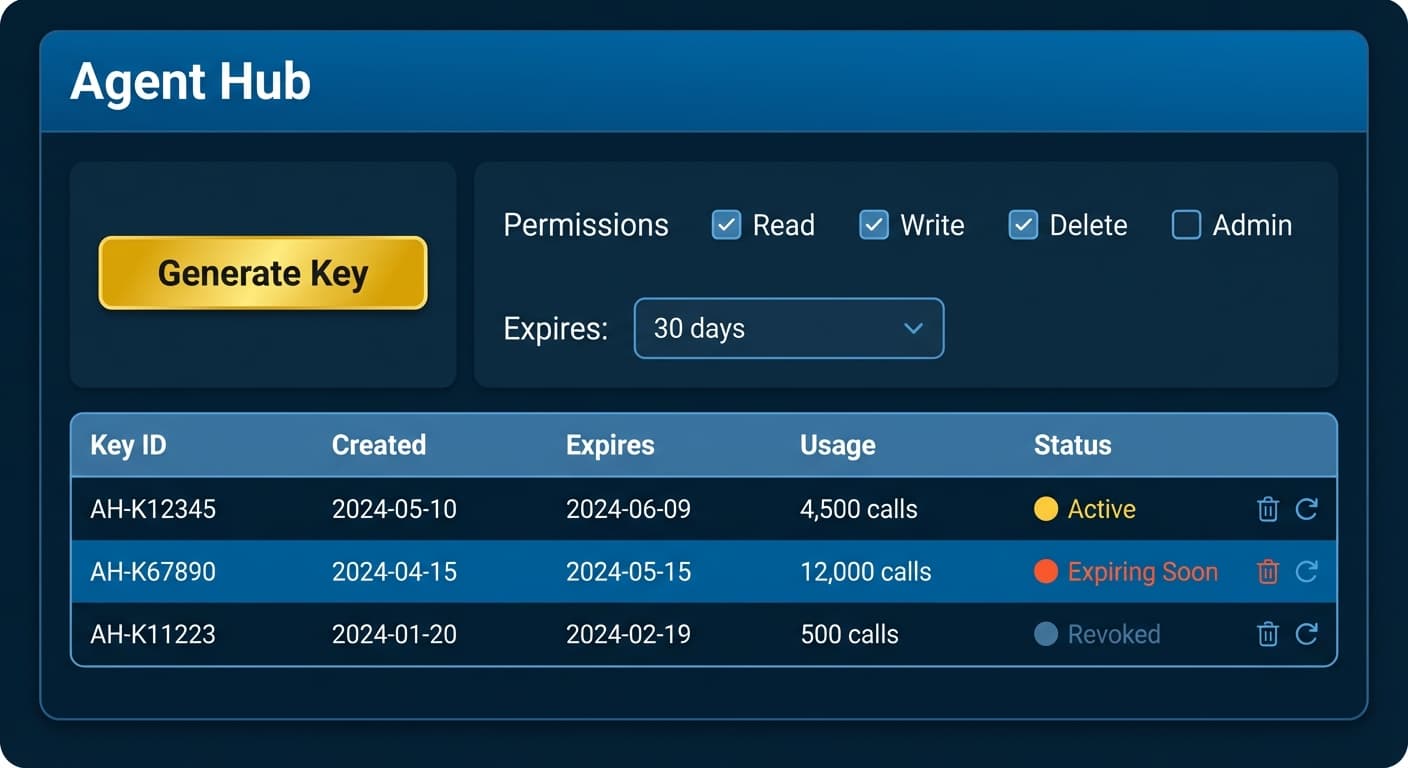
Here's my proposal: every app's settings page should have an Agent Hub section.
Not buried in a developer portal. Not requiring you to register an OAuth application. Just a simple section in settings where you can:
- Generate an agent key with one click
- Select scopes for what the agent can access
- See rate limits clearly displayed
- Revoke or rotate keys when needed
- Monitor usage in real-time
That's it. No OAuth dance. No redirect URIs. No PKCE flows. Just: "Here's a key for your agent. It can do these things. Revoke it anytime."
The Good Examples
@stripe nails it. Go to Settings > Developers > API Keys, and you see your keys immediately. Test mode and live mode, clearly separated. Click to reveal, copy to clipboard, done.
@linear gets it too. Settings > Security & Access > API. Personal API keys that you generate in seconds. No OAuth required for internal tools.
@NotionHQ created the integration token pattern. Go to notion.so/my-integrations, create an integration, copy the token. Then share specific pages with that integration. Explicit, understandable, secure — without the OAuth complexity.
@github evolved beautifully with fine-grained personal access tokens. Settings > Developer Settings > Personal Access Tokens > Fine-grained. You can scope a token to specific repositories, specific permissions, with expiration dates. OAuth-level granularity with API-key simplicity.
The pattern is clear: all four let you generate a working token in under 30 seconds from settings. No redirect URIs. No OAuth dance. No developer portal application approval.
The AI-native companies get it even better. @firecrawl and @ExaAILabs — built specifically for AI agent workflows — show what happens when token generation is a core product decision. Sign up, grab your API key, paste it into your environment. Total time: under a minute.
The Bad Examples
@Atlassian requires OAuth 2.0 for Jira and Confluence integrations, and — I'm not making this up — you can only register a single callback URL per OAuth app. The community has been screaming about this for years.
@Microsoft exemplifies the "powerful once you get there" problem. To connect an agent to Microsoft 365, you need to: navigate to Azure Active Directory, register an application, configure the correct tenant type, request individual Graph API permissions, wait for admin consent, and pray you got the redirect URI format exactly right. The Microsoft Graph API itself is excellent. But no non-developer will successfully complete this setup on their first try. The documentation alone spans hundreds of pages.
@Google has a similar story. The APIs are genuinely powerful. But finding them? Google Cloud Console, Google AI Studio, Google Workspace Admin — service names change frequently, consoles get reorganized.
The Auth Landscape
Before we go further, let's map the terrain.
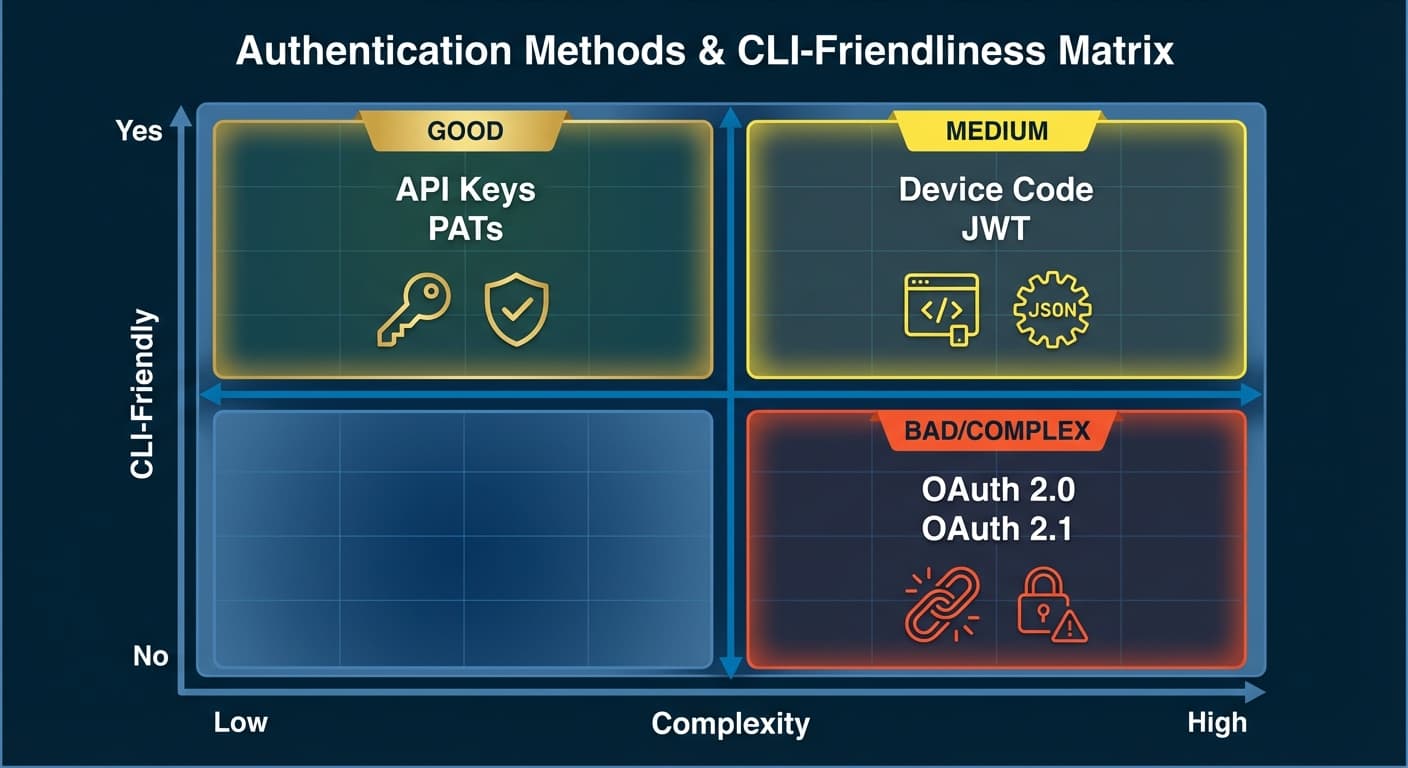
The sweet spot for AI agents? API keys and PATs. They're simple, they work in terminals, and they can still be scoped and revoked. GitHub's fine-grained PATs prove you can have granular permissions without OAuth complexity.
Device Code Flow is the compromise for apps that insist on OAuth — you get a code, open a browser separately, authenticate there, and the CLI picks up the token. It works, but adds friction.
The worst case? Traditional OAuth 2.0 with redirect URIs. An agent running in a terminal has no browser to redirect to, no localhost port to receive callbacks. You end up with convoluted workarounds or manual token copy-paste.
The MCP Gap
MCP has done incredible work standardizing the protocol for agents. But for remote servers? Full OAuth 2.1. Six-step flows. Browser redirects.
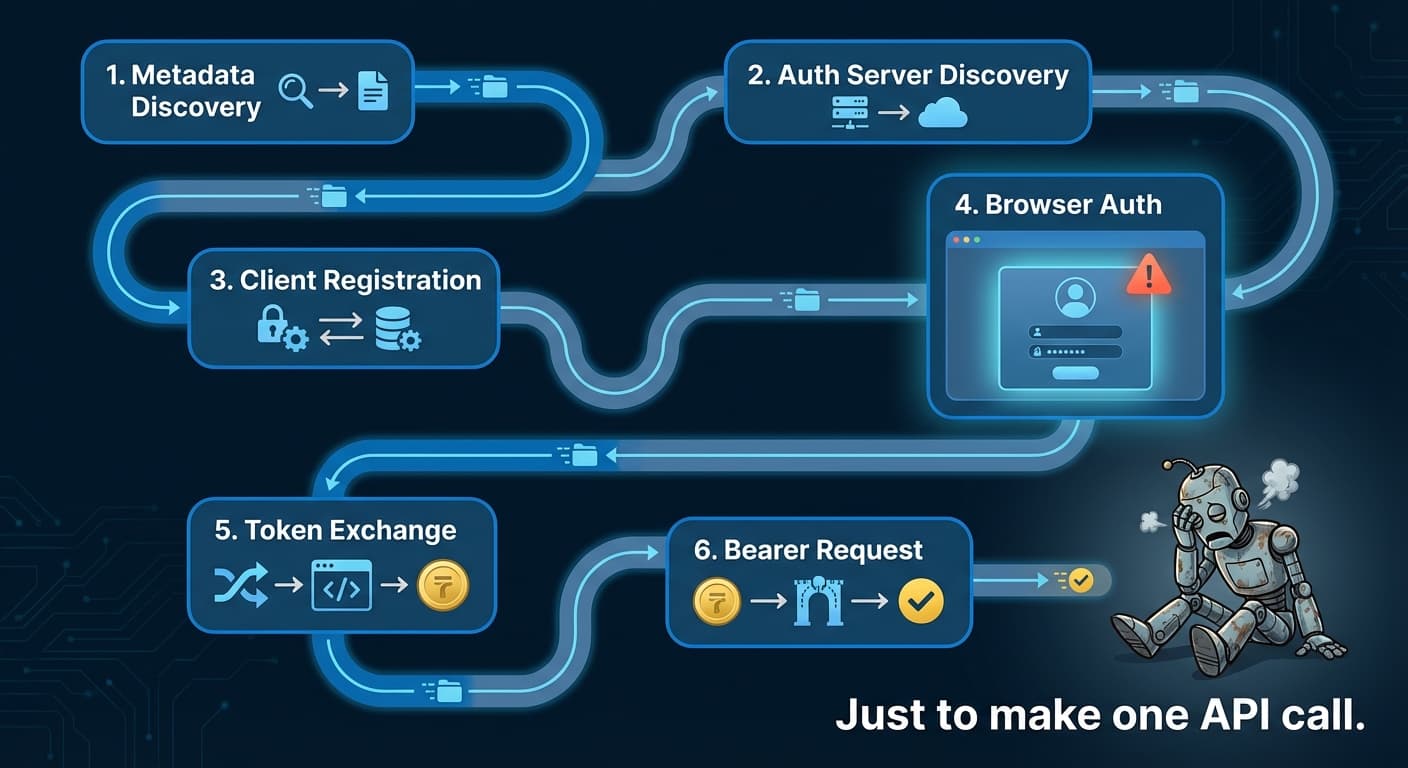
MCP tells us how to call tools. It doesn't tell us how to authenticate. And without a standard for simple auth, every MCP server becomes its own integration project.
When your protocol generates workaround libraries, something's wrong.
The Agent Hub Pattern
What would a real standard look like? Here's my proposal:
The Agent Hub is a dedicated section in every app's settings with:
- Key Generation: One button to create a new agent key
- Scope Selection: Checkboxes for what the agent can do (read, write, admin)
- Expiration Options: 7 days, 30 days, 1 year, or no expiration
- Usage Dashboard: How many calls, which endpoints, when
- Instant Revocation: One click to kill a compromised key
- Rotation Support: Generate new key while old one still works (grace period)
No redirect URIs. No OAuth application registration. No developer portal hoops.
Simplifying the decision to use Sanctum or Passport for API authentication. 🧘♂️
— Taylor Otwell (@taylorotwell) November 7, 2025
Building API and need to give users API keys → do you want them to obtain those keys through an OAuth flow?
If yes, use Passport (it's a library specifically for doing OAuth).
If no, use Sanctum.
If the experts are advocating for simplicity, why are most apps still forcing OAuth complexity?
The Counterarguments (And How to Address Them)
Let me be honest: there are legitimate security concerns with API keys.
"API keys are static and long-lived." In 2023, Toyota's T-Connect service was exposed through a leaked API key that had been sitting in a public GitHub repo for five years. Five years. The key granted access to 296,000 customer records.
"Keys lack user context." An API key doesn't carry information about who is using it. OAuth tokens can identify the user, the client, the session.
"AI agents amplify the risk." Auth0's security team identified four unique risks when AI agents use API keys: overprivileged access, key exposure in logs or prompts, no separation between testing and production, and autonomous action without human review.
These are real concerns. Here's how to address them:
- Short expiration by default. 7-day, 30-day, and 90-day options. Make users consciously choose longer durations.
- Granular scopes from the start. Read-only by default; write access requires explicit selection.
- Real-time monitoring and alerts. If a key suddenly makes 1000x its normal API calls, alert the user immediately.
- One-click revocation. The moment something seems wrong, kill the key instantly.
- Never hardcode, never share in plaintext. Keys belong in environment variables, secrets managers, or vaults.
- Rotation support. Generate a new key while the old one still works for 24 hours.
GitHub's fine-grained PATs prove that API keys can have OAuth-level granularity. The security features OAuth provides aren't exclusive to OAuth.
The real security risk is complexity itself. Frustrated developers take shortcuts. Shortcuts create vulnerabilities.
The Risk Acceptance Conversation
Here's the honest framing: enabling AI agents to access your data involves a trade-off.
You can have maximum security with maximum friction — OAuth flows, admin approvals, developer portals — and your AI agent will never successfully connect to anything.
Or you can have reasonable security with reasonable friction — granular API keys, monitoring, short expiration, instant revocation — and actually benefit from the AI capabilities available today.
The companies at the frontier — the ones shipping AI-native products — have made this trade-off. Stripe, Linear, Notion, GitHub. They trust their users with keys because they built the guardrails: scopes, monitoring, revocation.
The question isn't "are API keys perfectly secure?" Nothing is. The question is: "can we make API keys secure enough to unlock the productivity gains of AI agents?"
With the right practices, the answer is yes.
What This Means
For users evaluating tools: Ask about agent access before you buy. "Do you have an Agent Hub? Can I generate API keys from settings? Or do I need to register an OAuth application?"
For builders: Add an Agent Hub to your settings page. Not a developer portal. Not a separate console. Put it where users already go for settings. One section, simple token generation, clear scopes. Your integration story becomes: "Go to settings, generate a key, paste it."
For vendors competing for AI-native customers: This is a differentiator. While your competitors require OAuth applications and developer portal access, you offer one-click agent keys. While they measure integration time in days, you measure it in minutes. Lead with your Agent Hub.
The Adoption Curve
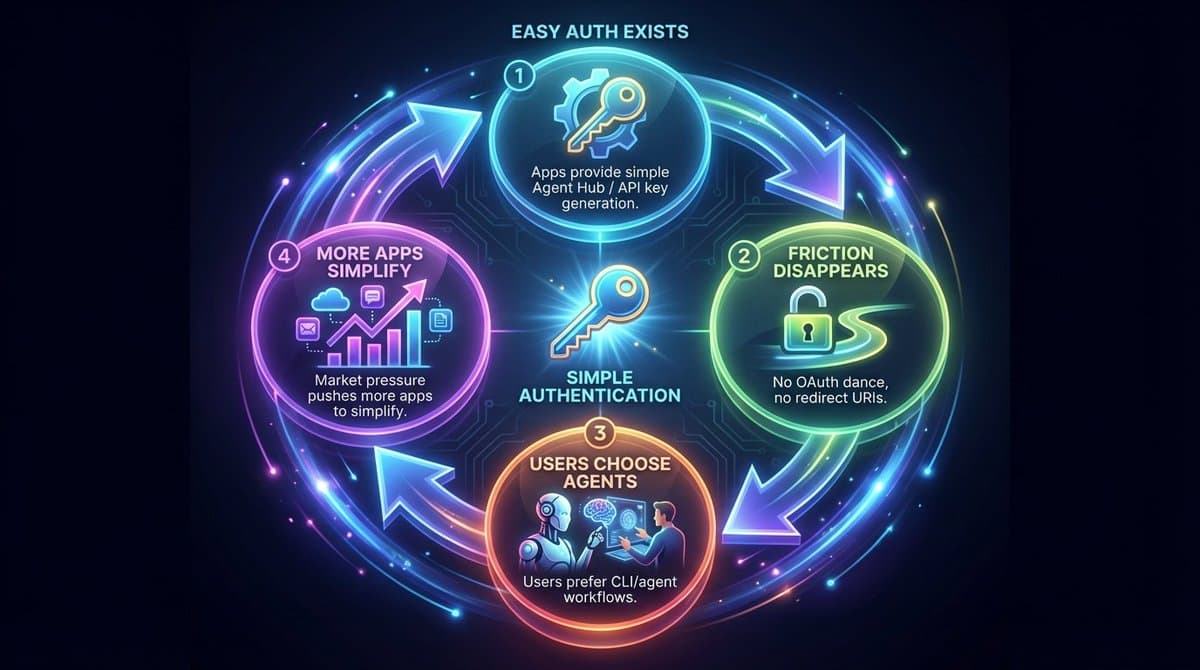
If Agent Hubs become standard — if every SaaS has a simple "generate agent key" button in settings — something shifts. The friction that currently keeps people using web UIs disappears.
Why click through a UI when your agent can hit the API directly? Why navigate menus when you can speak a command? The UI becomes what it should have always been: a dashboard for monitoring, not a required interface for doing work.
In CLI is all you need, I talked about the inversion: humans moving to where AI works best. In User ↔ Agent ↔ Swarm, I talked about the trust required to let agents work alongside you.
The Agent Hub is the bridge. It's what makes that inversion frictionless. It's what makes trust practical.
Right now, connecting an agent to a new tool is a project. It should be a setting.
The staff entrance exists. The hallway is beautiful. We just need someone to hand out keys.
The Ask
Next time you're frustrated with an OAuth flow — next time you spend hours debugging redirect URIs or wondering why your tokens expired — ask the vendor: "Where is the Agent Hub?"
If they don't have one, tell them what you need. A settings section. One-click key generation. Clear scopes. Simple revocation.
The staff entrance exists. The hallway is beautiful. We just need someone to hand out keys.
Also published on