25 min read
The Missing Protocols
I'm not an engineer. I didn't study computer science. I spent the past six months building AI agent workflows. Running multi-agent swarms. Creating custom skills and MCP servers. And I kept running into the same problems. The model harnesses are good. Stop competing on primitives, start collaborating on protocols.
I'm not an engineer. I didn't study computer science. My background is consulting and business development — the kind of work where success is measured in relationships and revenue, not commits and pull requests. I'm not the obvious answer to the question "what are you doing with AI?" But, I have been immersed deep into the technology and I have a few things to say.
I spent the past six months building AI agent workflows. Running multi-agent swarms. Creating custom skills and MCP servers. Trying to make these tools do actual work beyond one-off demos. Applied AI.
And I kept running into the same problems.
The Friction Everyone Hits
A skill that worked perfectly on my laptop would break on my VPS because of hardcoded paths. An MCP server configured for Claude Code wouldn't work in Cursor without modification. Hours spent building something useful, more hours spent making it work somewhere else.
I talked to other developers building in this space. Same stories. Same frustrations.
- "Why can't I just share this skill?"
- "Why do I have to reconfigure everything for each harness?"
- "Where's the marketplace where I could actually sell the tools I'm building?"
The Landscape
The model harnesses — Claude Code CLI, Codex CLI, Gemini CLI, Opencode CLI — are genuinely impressive. The models underneath them are getting better fast. But the ecosystem around them is fragmented in ways that slow everyone down.
MCP servers exist, but the cross-harness story is still rough. Skills exist, but every harness does things differently and deploying across environments is a challenge. Instructions exist, but Claude wants CLAUDE.md and Cursor wants .cursorrules and nothing works everywhere.
People investing serious time in agent tooling have no path to monetization. The marketplace layer that exists for mobile apps, IDE plugins, and npm packages? Missing.
And underneath all of it, there's no standard way to tell an agent "here's what this machine looks like." We're building sophisticated AI workflows on top of "works on my machine" chaos.
What I'll Cover
This article is my attempt to map the problem and propose some solutions.
I'll walk through the stack as I understand it — where the standardization is working, where it's not, and what I think needs to happen next.
I'll talk about what's working: MCP adoption has been genuinely remarkable, and the Skills ecosystem is growing fast.
I'll talk about what needs faster alignment: the primitives that every harness implements differently.
I'll talk about the marketplace gap: why the absence of a monetization layer matters, and what it would take to fix it.
And I'll share what I built to solve one piece of this for myself — a machine configuration protocol called the HarnessOps Spec (hop) — not because I think it's the definitive answer, but because something needs to exist in that layer.
If you're building AI agent tooling — whether you're at a major lab, working on a model harness, or just trying to make your own workflows better — I'd love to know whether this matches your experience.
The thesis is simple: the model harnesses are good. Stop competing on primitives, start collaborating on protocols. The faster we standardize, the faster we all move.
I've never felt this much behind as a programmer. The profession is being dramatically refactored as the bits contributed by the programmer are increasingly sparse and between. I have a sense that I could be 10X more powerful if I just properly string together what has become…
— Andrej Karpathy (@karpathy) December 26, 2025
Let's dig in.
Section 1: The Stack
"Attention is all you need."
That paper title has aged well. But here's the confession I need to make upfront: for the longest time, I had no idea what was happening between me typing a question and the AI responding. I just knew it worked — sometimes brilliantly, sometimes frustratingly — and I kept throwing money at subscriptions hoping the next update would fix the gaps.
Then I started building. Actually building — not just using. Running agent swarms, creating custom workflows, trying to make these tools do real work. And somewhere in that process, I finally understood the stack I'd been working on top of all along.
Here's how I've started thinking about it — and I'm still refining this mental model, so push back if it doesn't match your experience.
The Four Layers
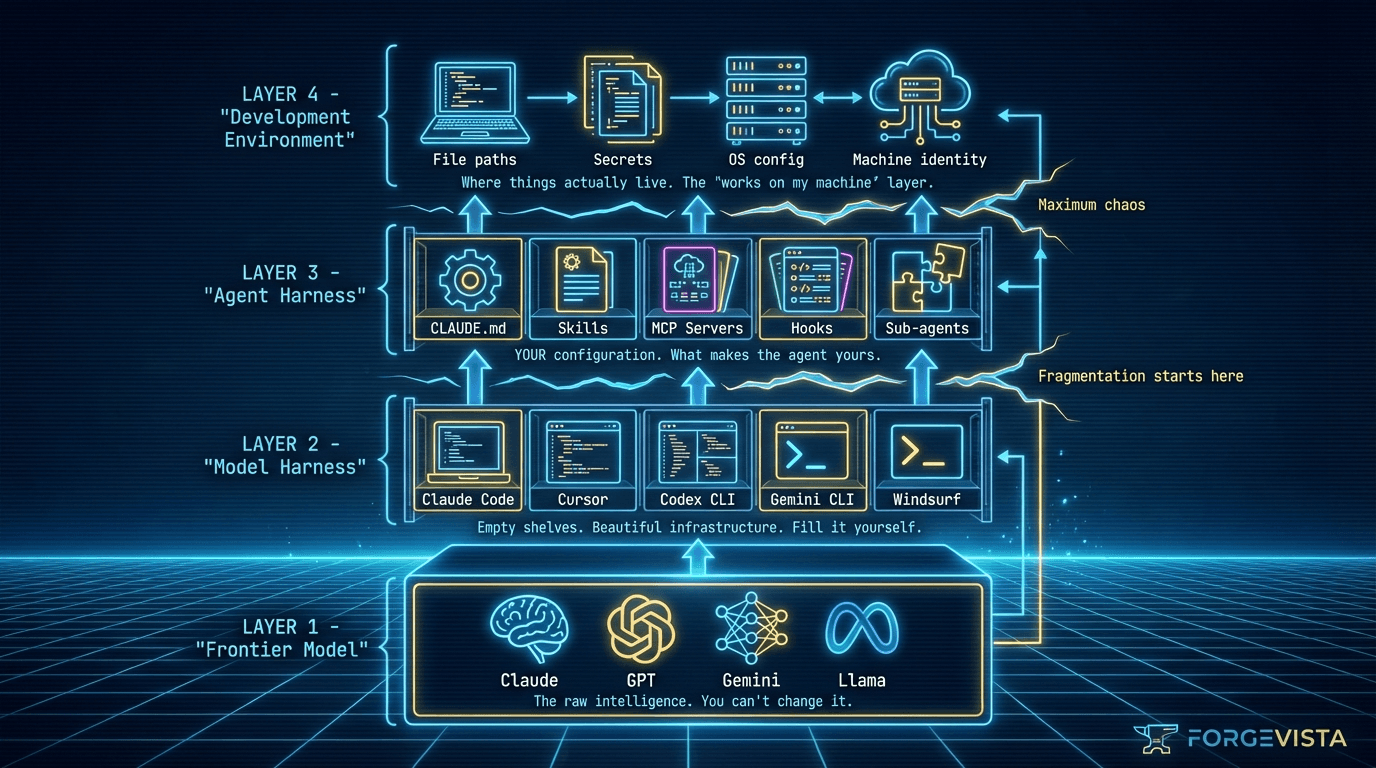
Layer 1: The Frontier Model
This is what everyone talks about. Claude, GPT, Gemini, Kimi — the model itself. The thing that was trained on internet-scale data and can reason, write code, and hallucinate confidently about things it doesn't know.
The model is impressive. It's also a black box that I, as a user, have essentially zero control over. I can't retrain it. I can't adjust its weights. I can only interact with what the model provider exposes.
One thing to notice in the diagram above: Layer 1 doesn't receive feedback from anything that happens in the layers above it. This is a common misconception — people assume LLMs have some kind of magical learning that happens during use. They don't. The base model's weights are frozen. When an AI assistant seems to "get better" at your tasks over time, that improvement is happening in the upper layers: you've refined your prompts, your instructions have gotten clearer, or a service you're paying for has built a "memory" feature that injects prior context. The model itself hasn't learned anything from your conversations.
Layer 2: The Model Harness
This is where things get interesting — and where I spent months confused about what I was actually using.
The model harness is the package wrapped around the frontier model. Claude Code CLI, Cursor, Codex CLI, Gemini CLI — these are all model harnesses. They take the raw model capabilities and add:
- A user interface (CLI, IDE, web)
- File system access
- Tool calling infrastructure
- Context management
- Permissions and safety controls
Here's the insight that changed how I think about this: model harnesses provide empty feature shelves.
They give you the capability to load custom instructions, but ship with blank CLAUDE.md files. They give you the infrastructure for MCP servers, but don't come with any installed. They give you hooks, but no hooks are defined.
The harness creators built beautiful shelving. Then they handed you the keys and said, "Fill it yourself."
Layer 3: The Agent Harness
This is where you — the user — come in.
Your agent harness is what you put on those empty shelves:
- Your
CLAUDE.mdwith project-specific instructions - Your MCP servers connecting to your data sources
- Your skills for specialized workflows
- Your hooks for automation
- Your sub-agent configurations
I call this the "agent harness" because this is what turns generalized agent intelligence into agentic intelligence for you. Two developers using the same Claude Code installation have completely different agent experiences based on what they've put on those shelves.
Layer 4: The Development Environment
And underneath all of this sits your actual machine. Your file system. Your secrets management. Your path structures. Your IDE. Your terminal.
This layer seems obvious until you try to share your agent harness with someone else, or run it on a different machine, and discover that everything breaks because paths are hardcoded and secrets don't transfer.
Why This Mental Model Matters
I spent a lot of time frustrated at "Claude" or "Codex" before I understood these layers.
The model would give weird answers — but was that the model's fault, or had I loaded conflicting instructions in my agent harness?
MCP servers would fail — but was that the protocol's fault, or was my development environment misconfigured?
Skills wouldn't work as expected — but was that the skill's fault, or was my model harness caching stale context?
Understanding the stack clarified where to look when things broke.
More importantly, it clarified where the standardization gaps live.
Where the Gaps Are
Layer 1 (Models): Reasonably standardized. API contracts exist. OpenAI's format became a de facto standard.
Layer 2 (Model Harnesses): This is where fragmentation starts. Every harness implements similar features differently:
- MCP server support varies, especially for certain configurations like HTTPS
- Skill formats differ
- Hook implementations are harness-specific
- Instruction file conventions vary
Layer 3 (Agent Harnesses): Maximum fragmentation. My agent harness works for me, on my setup. Sharing it requires significant customization by the recipient.
Layer 4 (Dev Environment): Chaos. Path structures are machine-specific. Secrets management is ad hoc. "Works on my machine" is the default state.
The model providers are doing their part. The model harness creators are building increasingly sophisticated features. But the standardization we need — the standardization that would let agent tooling become an actual ecosystem rather than a collection of individual setups — that's what's missing.
That's what this article is about.
Section 2: What's Working
Before I get into what needs fixing, let me be clear: I'm not writing this from a position of despair. The opposite, actually.
A year ago, connecting an AI assistant to external data was a custom development project. You either wrote bespoke API integrations, hacked together fragile workarounds, or gave up and copy-pasted context manually. I did all three.
Something remarkable has happened since then.
MCP: From Experiment to Standard
Anthropic released the Model Context Protocol in November 2024. The numbers tell the story: 97 million monthly SDK downloads. 10,000+ active public MCP servers. And the adopters aren't just small players building hobby projects — ChatGPT, Cursor, Gemini, VS Code, and Microsoft Copilot all added MCP support within twelve months.
Then in December 2025, something even more surprising: Anthropic donated MCP to the Agentic AI Foundation (AAIF), a new Linux Foundation initiative. The co-founders? Anthropic, Block, and OpenAI.
Supporting members include Google, Microsoft, AWS, Cloudflare, and Bloomberg.
David Soria Parra, the lead MCP core maintainer, put it simply: "This move formalizes that commitment — ensuring MCP's vendor-neutrality and long-term independence under the same neutral stewardship that supports Kubernetes, PyTorch, and Node.js."
When your competitors join forces on infrastructure, that's not marketing. That's recognition that competing at the protocol layer wastes everyone's time.
Skills: The Knowledge Layer Emerges
While MCP handles tool and data access, a different standardization effort has been quietly gaining traction: Skills.
The insight that drove Skills is one I lived for months before I understood it: agents are increasingly capable, but they often lack the context to do real work reliably. You could give Claude access to any tool in the world, but if it doesn't know how your team writes PRs or what your deployment process looks like, it's going to generate generic output that requires heavy editing.
Skills solve this by packaging procedural knowledge — company-specific, team-specific, user-specific context that agents can load on demand.
The numbers here are also striking. SkillsMP, one of the emerging Skills marketplaces, reports 87,000+ skills indexed across Claude Code, OpenAI Codex CLI, and other SKILL.md-compliant tools. The official Anthropic skills repository on GitHub has 6,700+ stars and counting.
As Teresa Torres (@ttorres) noted in her Claude Code guide: "By focusing on one tool, I've been able to learn how to use Claude Code's building blocks."
That's the promise of Skills — building blocks that work across contexts, once you learn them.
Don't sleep on Skills.
— elvis (@omarsar0) October 17, 2025
Skills is easily one of the most effective ways to steer Claude Code.
Impressive for optimization.
I built a skill inside of Claude Code that automatically builds, tests, and optimizes MCP tools.
It runs in a loop, loading context and tools (bash… pic.twitter.com/OhrP6rOvwJ
Cross-Platform Compatibility: It's Happening
Here's what surprised me most: the cross-platform story is actually materializing.
MCP servers I built for Claude Code work with Cursor. Skills formatted as SKILL.md work across multiple harnesses. The "agent skills spec" (agentskills.io) explicitly lists Claude Code, OpenAI Codex CLI, and ChatGPT as supported platforms.
Reza Rezvani (@RezaRezvaniBln) documented a Codex CLI Bridge skill that enables "Claude Code ↔ OpenAI Codex CLI interoperability." When individual developers are building cross-harness compatibility tools, you know the ecosystem is moving in the right direction.
The Foundation Is Being Built
I'm not naive about this. We're still early. There are gaps — significant gaps — that I'll address in the next section.
But the trajectory matters. Compare where we are today to twelve months ago:
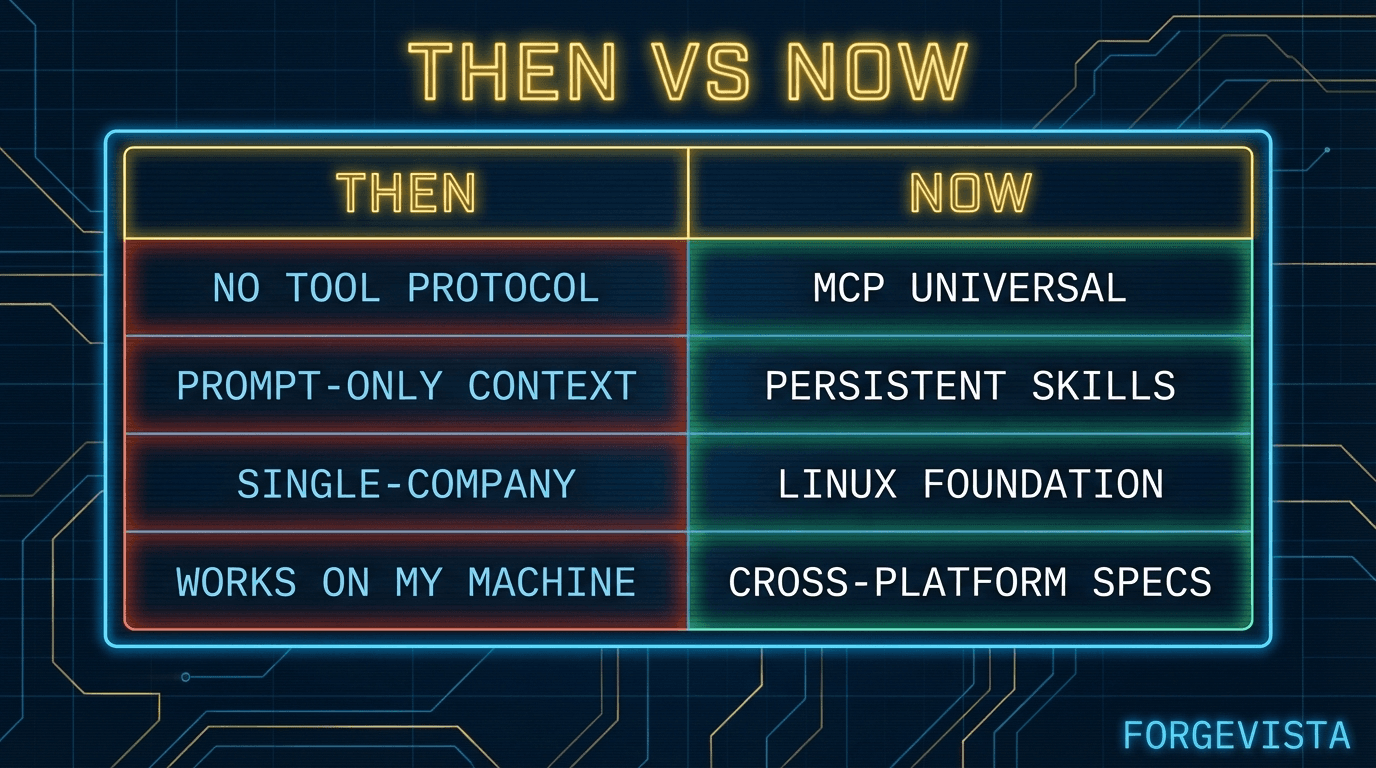
The model providers and harness creators deserve credit for this. Anthropic shipped MCP and then gave it away. OpenAI and Google joined rather than competing. The MCP core maintainers kept the spec evolving based on real-world feedback.
The momentum is right.
What needs to happen next is alignment — faster alignment — on the pieces that are still fragmented.
Section 3: What Needs Faster Alignment
I keep a list.
Every time I build something for my agent setup that I can't easily share with someone else — or move to a different machine — I write it down. The list has gotten long.
It's not that these features don't exist. Every model harness has some version of instructions, hooks, sub-agents, commands. The problem is that every harness implements them differently. What works in Claude Code doesn't work in Cursor. What I build for Codex CLI needs rewriting for Gemini CLI.
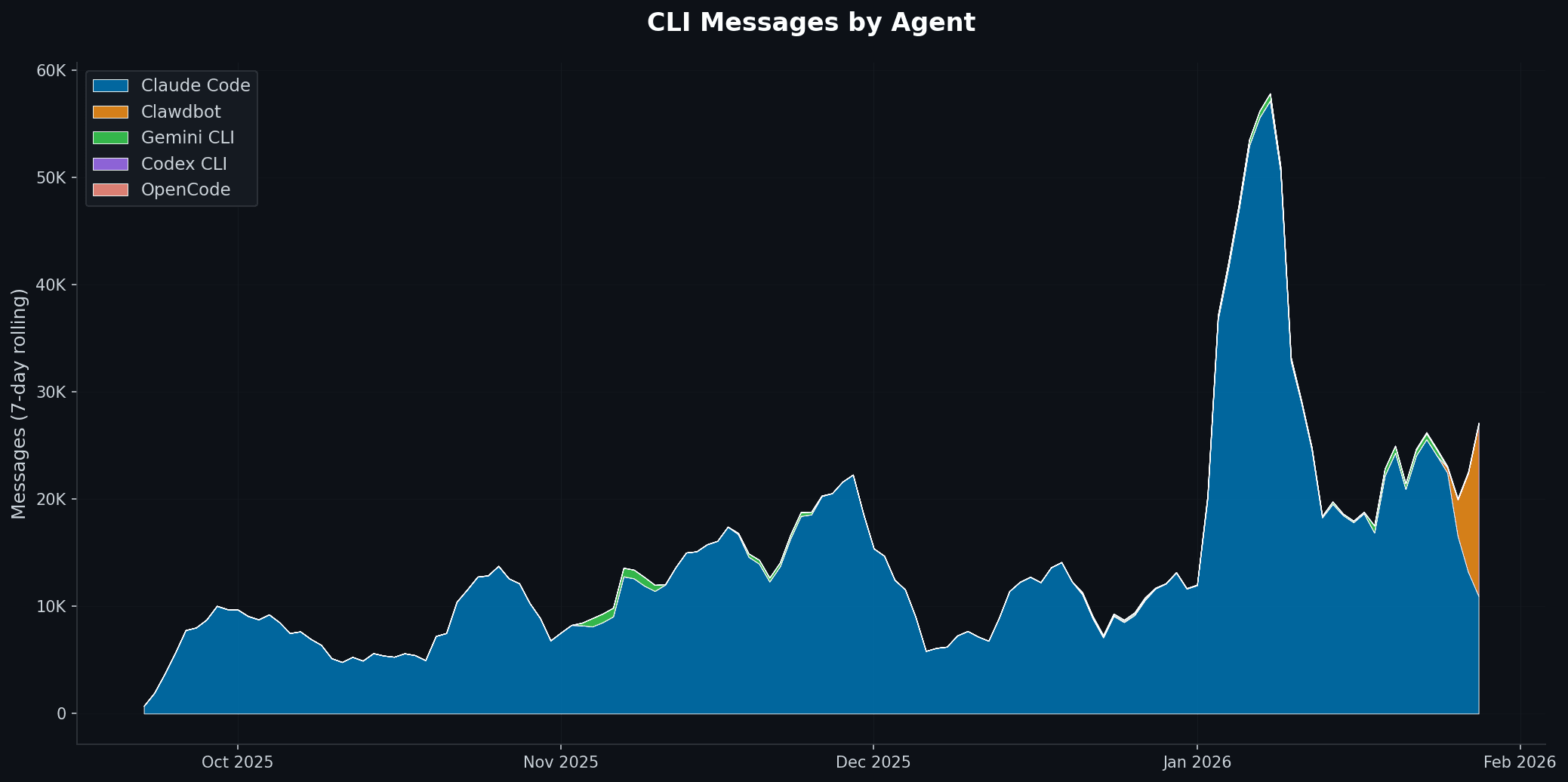
No matter how badly I want to, every time I try to switch to a different model harness the overhead is too much. [ ...clawdbot has entered the chat... ]
Here's my current inventory of the primitives that need faster alignment. For each, I've tried to capture: where we are, what needs to happen, and the safety considerations that should be part of the conversation.
The Primitives Table
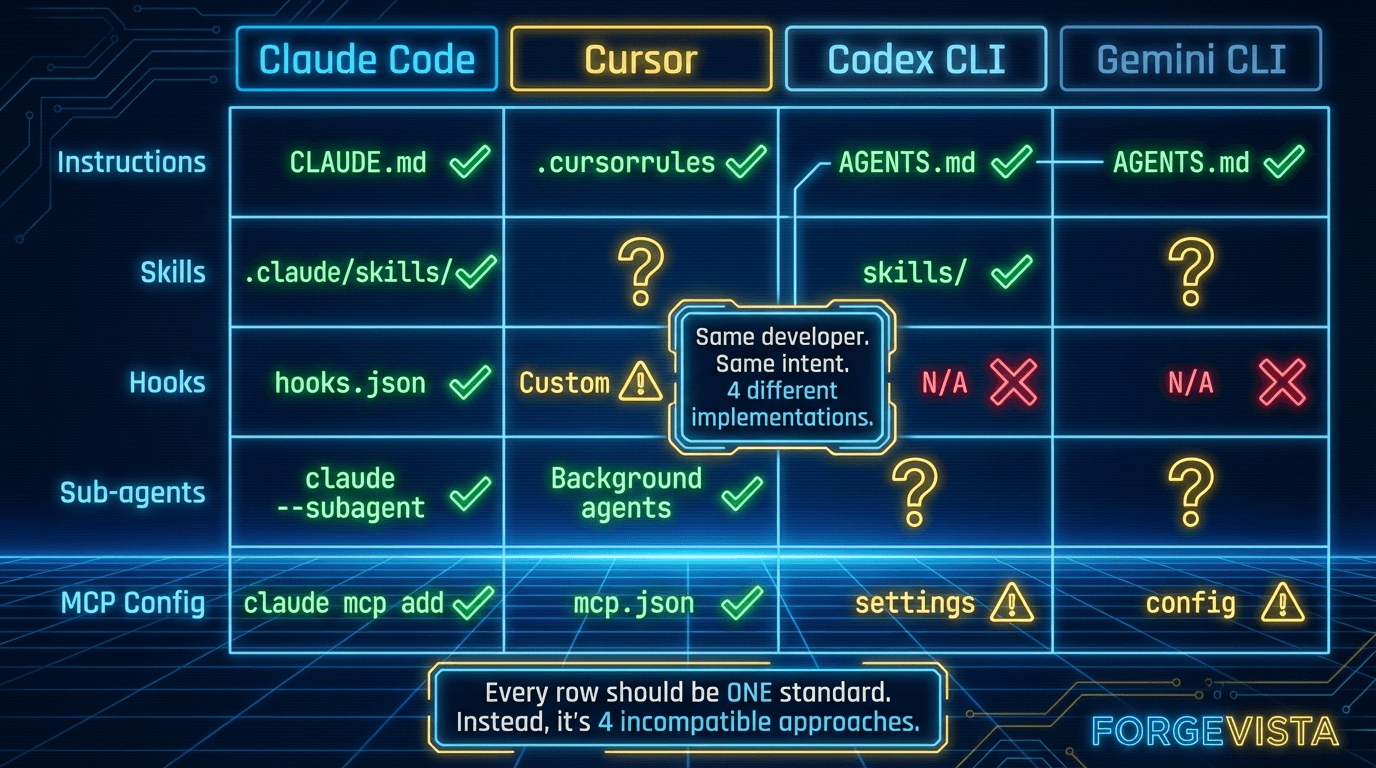
Let me expand on each.
MCP: The Success Story (Keep Going)
Writing an MCP service as a developer is so incredibly frustrating right now. The number of hours I have spent trying to get a bare bones MCP service with auth running on major providers (claude desktop, claude code, vs code, cursor, windsurf, cline, chatgpt) is downright…
— Jeff Escalante (@jescalan) July 25, 2025
@jescalan on the frustration of getting MCP auth working across Claude Desktop, VS Code, Cursor, Windsurf, and other providers
MCP is the proof that this can work. Anthropic shipped it, the ecosystem adopted it, and now it lives under neutral governance.
But the work isn't done. Simon Willison (@simonw), one of the most thoughtful security voices in the space, has documented prompt injection vulnerabilities in MCP implementations. AuthZed published a timeline of MCP-related security incidents as adoption scaled.
Current state: Near-universal adoption. 97 million monthly downloads.
What needs to happen: Auth standardization is the next frontier. MCP shipped without a complete auth story — intentionally, to reduce adoption friction — but production deployments need clear patterns for OAuth, API keys, and credential management.
Safety considerations: Server sandboxing should be standard. Permission scopes should be explicit and auditable. Every tool call should be loggable for compliance contexts.
Skills: Consolidation Time
Skills are where I've invested the most personal time. I have dozens of custom skills that encode my workflows, my team's conventions, my preferred approaches.
The cross-platform promise is real — SKILL.md works across multiple harnesses — but the marketplace story is still fragmented. SkillsMP, claude-plugins.dev, and the official Claude marketplace all exist, but they don't interoperate cleanly.
Current state: Growing adoption. 87K+ skills indexed. Multiple competing registries.
What needs to happen: Registry consolidation or federation. Imagine a world where skill install git-workflow works the same way regardless of which harness you're using, pulling from a unified registry.
Safety considerations: Skill source verification matters. When I install someone else's skill, I'm trusting their instructions will run in my agent's context. Version pinning, signature verification, and source transparency should be table stakes.
Our biggest problem is the terrible shortage of rule files
— Kevin Kern (@kevinkern) June 25, 2025
AGENTS .md,
CLAUDE .md,
GEMINI .md
.cursorrules, (.cursor/rules)
.windsurfrules,
.clinerules,
vscode - .github/copilot-instructions.md
bolt - .bolt/prompt
.rules
Instructions: The CLAUDE.md Problem
Here's a concrete example of fragmentation that costs me time every week.
Claude Code looks for CLAUDE.md. Cursor looks for .cursorrules. Some tools expect .instructions. Some read from AGENTS.md. OpenAI donated AGENTS.md to AAIF alongside MCP — which suggests they see the need for standardization — but we're not there yet.
Current state: Every harness has its own convention.
What needs to happen: A unified project-level instructions spec. It doesn't need to be complicated — just agreed upon. Maybe AGENTS.md becomes the standard. Maybe we use a directory structure. The format matters less than having one format.
Safety considerations: Instruction override protections are underappreciated. If my project has a CLAUDE.md that says "never delete files without confirmation," I need confidence that won't get overridden by something in my home directory. Scope precedence should be explicit.
Hooks: The Missing Standard
I went looking for cross-harness hook documentation while researching this article.
I didn't find much.
That's because no cross-harness standard exists. Claude Code has hooks. Cursor has something similar. But they work differently, trigger on different events, and have different configuration formats.
Current state: Harness-specific implementations. No interoperability.
What needs to happen: Someone needs to propose a simple hook lifecycle spec:
- Standard event names (
pre-commit,post-file-change,on-error, etc.) - Standard configuration format
- Standard execution model
This doesn't require consensus from every harness creator upfront. Ship a spec, demonstrate it working, and let adoption validate the approach.
Safety considerations: Hooks run code in response to events. They need sandboxing by default, resource limits, and clear failure handling. A hook that crashes shouldn't bring down the agent.
Sub-agents: The Wild West
Let me be precise about what I mean here. I'm not talking about agent swarms or fleets — multiple CLI sessions running in parallel, coordinating through external messaging. That's a separate topic I'm actively exploring, but it's an abstraction layer above what this article covers.
What I'm talking about is the sub-agent feature within a single CLI session: the ability for your agent to spawn a child process to go off, do focused work, and return a result.
This is one of the most powerful patterns in modern model harnesses, and it's underappreciated. Here's why it matters: sub-agents get their own context window.
When you're deep into a long-running session — thousands of tokens of conversation history, file contents, prior decisions — your context is precious and filling up fast. If you need research done, or a code review, or a complex calculation, you have two choices: burn your own context doing it, or spawn a sub-agent.
The sub-agent starts fresh. It does the focused work. It returns a simplified answer — just the result you needed, not the entire journey to get there. Your main context stays clean. You get the answer without the overhead.
Every harness that supports this does it differently. How do you specify what context the sub-agent starts with? How do you configure recurring sub-agent patterns for tasks you run repeatedly? How do you terminate one that's gone off track?
Current state: Emerging feature. Every implementation is bespoke.
What needs to happen: Standardized patterns for:
- Spawn (create a sub-agent with specified context and constraints)
- Configure (define reusable sub-agent profiles for common tasks)
- Return (how results flow back to the parent session)
- Terminate (clean shutdown when done or when things go wrong)
The goal isn't just interoperability — it's letting users configure sub-agents for ongoing, repeatable use. I should be able to define a "research" sub-agent profile once and invoke it consistently, across sessions, across harnesses.
Safety considerations: Permission inheritance is the big question. If I spawn a sub-agent, what permissions does it inherit? What context boundaries apply? Can a sub-agent spawn its own sub-agents? This needs to be explicit, not implicit.
Finally got a handle on multi-agent orchestration with Claude Code. It's extremely easy to mess up (and use LOADS of compute for nowt). But also possible to land the plane. Some quick lessons learned.
— Seth Lazar (@sethlazar) December 31, 2025
So the task is to do deep semantic analysis of a corpus of about 1000 research… pic.twitter.com/6htYqqgz0g
(For those curious about full agent swarms — multiple CLI sessions coordinating through external protocols — that's a topic for another article. The orchestration challenges there are real, but they build on top of these primitives.)
Commands: Discovery Matters
Slash commands are a user interface pattern that most harnesses support. /commit, /review, /test — quick invocations for common workflows.
The problem isn't that commands don't exist. The problem is discovery. I can't easily see what commands are available in a given context. I can't programmatically list them. There's no standard way to invoke them from another tool.
Current state: Fragmented. Works, but not interoperable.
What needs to happen: Unified command discovery and invocation. Something like:
$ agent commands --list
$ agent commands --invoke /commit --args "fix typo"
Safety considerations: Commands that do destructive things (delete files, push to production, etc.) should require confirmation by default. Scope limits should prevent commands from operating outside their designated contexts.
The Counterargument
I know what some readers are thinking: "Standards slow things down. Let the market decide. Competition produces better products."
Fair point. And there's truth to it at the application layer. I want Claude Code, Cursor, and Codex competing to build the best user experience.
But competing at the primitive layer is like car manufacturers building different gasoline formulas. It doesn't make the cars better. It just makes fueling inconvenient.
The primitives I've listed — MCP, Skills, Instructions, Hooks, Sub-agents, Commands — are infrastructure. They're the plumbing that everything else builds on. Standardizing them doesn't reduce competition. It enables a larger ecosystem of tools that can compete on what actually matters: user experience, specialized capabilities, quality of execution.
Section 4: The Marketplace Gap
Let me tell you about the economics of my current setup.
I've invested hundreds of hours building skills, hooks, and custom workflows for my agent environment. I've spent real money — subscriptions, compute, API calls. The setup works great. For me. On my machines. With my specific configuration.
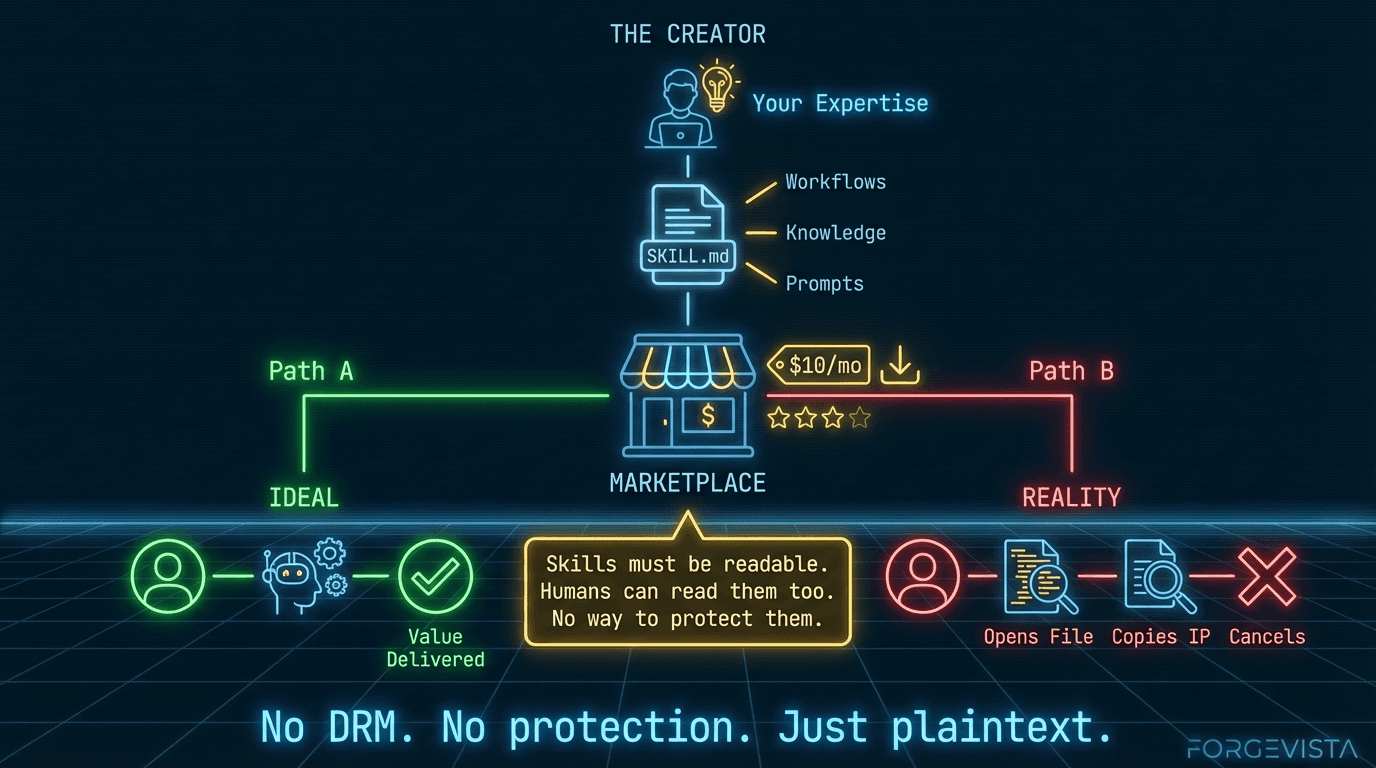
But here's the uncomfortable truth: I can't share it in a way that someone else could buy, install, and use without significant customization.
There's no marketplace where I could list my skills and have someone pay $10/month to use them. There's no npm-for-agent-tools where I could publish packages that work across harnesses. The path to monetizing this work doesn't exist.
And that means the ecosystem runs on volunteer labor.
The Volunteer Problem
I'm not looking for sympathy. I build this stuff because I find it valuable for my own work. But I've met a lot of developers who are thinking about going deeper — building more sophisticated MCP servers, creating comprehensive skill libraries, developing specialized tools for specific industries.
The conversation always ends the same way:
"But how would I monetize it?"
They can open-source it and hope for GitHub Sponsors. They can try to sell consulting services. They can build a SaaS backend and give away the client for free. But they can't just build a tool, price it, and sell it to people who need it.
That's a problem. Because we're asking the people best positioned to create high-quality agent tooling to do it in their spare time, for free, indefinitely.
What Works Elsewhere
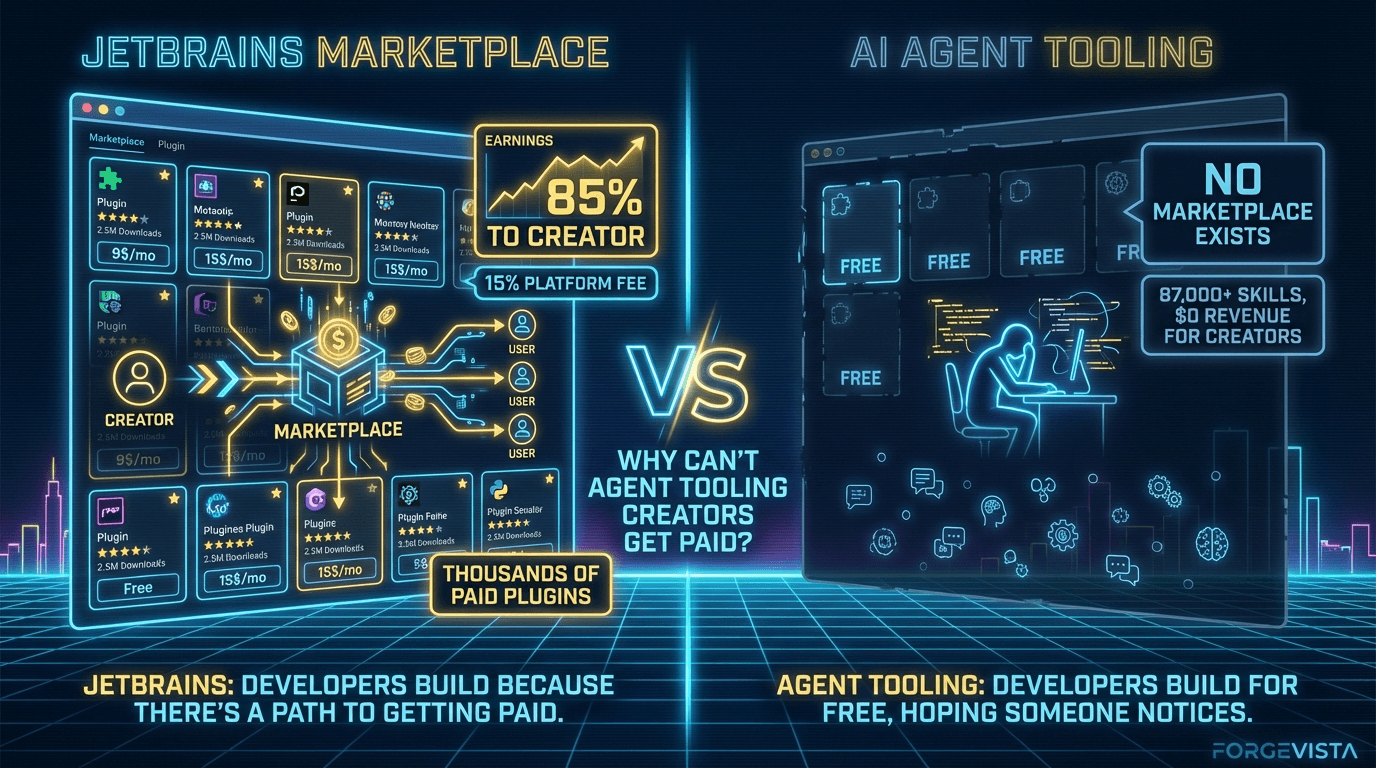
The marketplace model isn't new — developer ecosystems have had this figured out for years.
This isn't an unsolved problem. The model we need for AI agent tooling already exists — it's the same model that powers the iOS App Store, Google Play Store, and every successful plugin ecosystem. Developers build something, list it, set a price, and the platform handles billing and distribution in exchange for a cut.
JetBrains Marketplace is probably the closest existing analogue to what an AI skills marketplace would look like. It's not perfect — they've had controversies, including removing negative reviews of their own AI Assistant plugin — but the infrastructure works. Developers build plugins, list them, set prices, and JetBrains handles billing, licensing, and distribution.
The economics are reasonable: 15% commission, minimum payout of $200, payment 30 days after month end. Compare that to Apple's 30% (now under regulatory pressure) or Google's similar cut. JetBrains' 10+ million IDE users represent a real market, and developers build for it because there's a path to getting paid.
VS Code, by contrast, has a massive marketplace — but no native monetization. Extensions are overwhelmingly free. There's a widely-discussed GitHub issue (#111800) titled "Find a way to allow us to monetize the extensions" from December 2020. It's still open.
Developers who want to charge for VS Code extensions resort to workarounds: external payment systems, license keys, feature gating with SaaS backends. It's friction that discourages quality commercial tooling.
The trend across platforms is clear: the 30% "app store tax" is declining under regulatory pressure, and ecosystems that support creator monetization attract better tools. The model isn't controversial — it's proven. What's missing is someone building it for agent tooling.
The playbook is easy:
— pash (@pashmerepat) March 3, 2025
1) Make an mcp server that does something useful (e.g. making beautiful UI components)
2) Let people sign up for an api key, first 5 requests are free
3) Increase limits for $20/mo
21st dev did this really well https://t.co/H3DRKFra3M
What an Agent Tooling Marketplace Could Look Like
Imagine this:
$ agent marketplace search "git workflow"

git-workflow-pro v2.1.3 by @devtools ($8/mo)
  ★★★★★ (342 reviews)
  "Comprehensive git automation with smart commit messages,
   branch management, and PR templates."
  Compatible with: Claude Code, Cursor, Codex CLI

commit-coach v1.4.0 by @aiassist (free)
  ★★★★☆ (89 reviews)
  "Basic commit message suggestions."
  Compatible with: Claude Code
You browse. You install. You pay (or not). The creator gets compensated. The marketplace handles billing, updates, reviews.
This isn't fantasy. This is how npm, PyPI, and JetBrains work. The infrastructure patterns exist.
The Economics
Based on marketplace precedents, here's what I think would work:
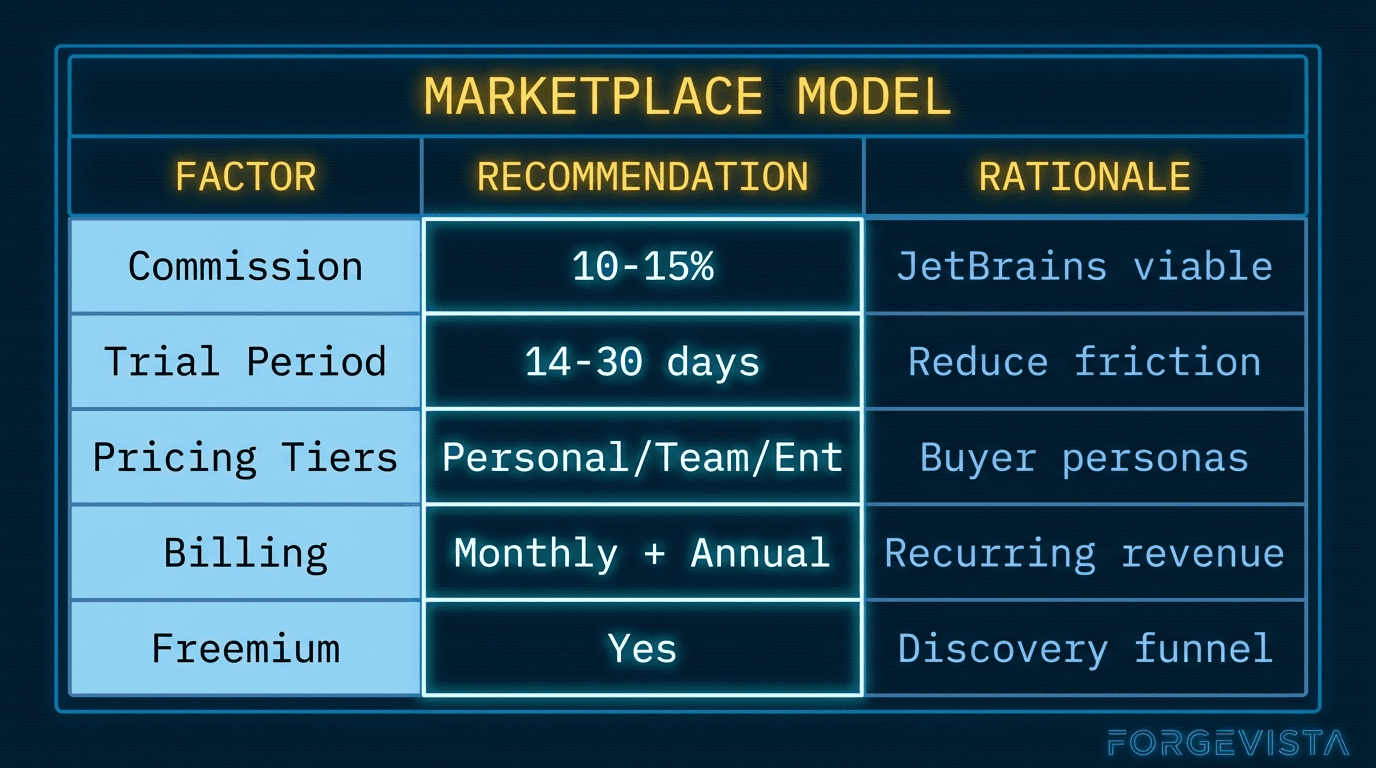
The infrastructure requirements aren't trivial:
- Billing and invoicing
- License management
- Usage analytics
- Version updates and compatibility tracking
- Review and rating systems
- Developer dashboards
But this is solved infrastructure. Payment processors exist. License management services exist. The pieces are available.
What's missing is someone willing to build the marketplace layer specifically for agent tooling — and to do it in a way that works across harnesses, not locked into a single ecosystem.
The Counterargument
"Why should big players like Anthropic or OpenAI care about this? They make money on API calls, not marketplaces."
Fair question. Here's the selfish case:
A thriving ecosystem of high-quality tools makes your platform more valuable. VS Code's free extension marketplace attracted developers, which attracted users, which made Microsoft's paid cloud services more appealing. The marketplace was a loss leader that paid off in ecosystem lock-in.
For agent tooling, the dynamic is similar. If Claude Code has the best marketplace of skills and tools, developers use Claude Code. If Cursor has better tooling available, developers use Cursor.
But here's the catch: if the marketplace is platform-specific, the tools stay siloed. Developers have to choose which platform to build for. Users can't take their tools with them when they switch harnesses.
Cross-platform compatibility is the unlock. A marketplace that works across Claude Code, Cursor, Codex CLI, and Gemini CLI creates a bigger pie for everyone — including the platform providers.
Who Should Build This?
I don't have a definitive answer. Maybe it's one of the major platforms investing in ecosystem development. Maybe it's an independent startup. Maybe it's a foundation-led initiative like what's emerging around MCP.
What I do know is that the current state — where serious investment in agent tooling has no path to monetization — can't last forever. Either someone builds the marketplace layer, or the ecosystem stays hobby-tier.
Section 5: Development Environment Primitives
I run agents on three different machines.
My local laptop — a WSL machine where I do most of my day-to-day development. A cloud IDE (analytics to AI platform) — where I run longer tasks and collaborate with others. And a VPS — an always-on server that handles scheduled jobs and heavy compute.
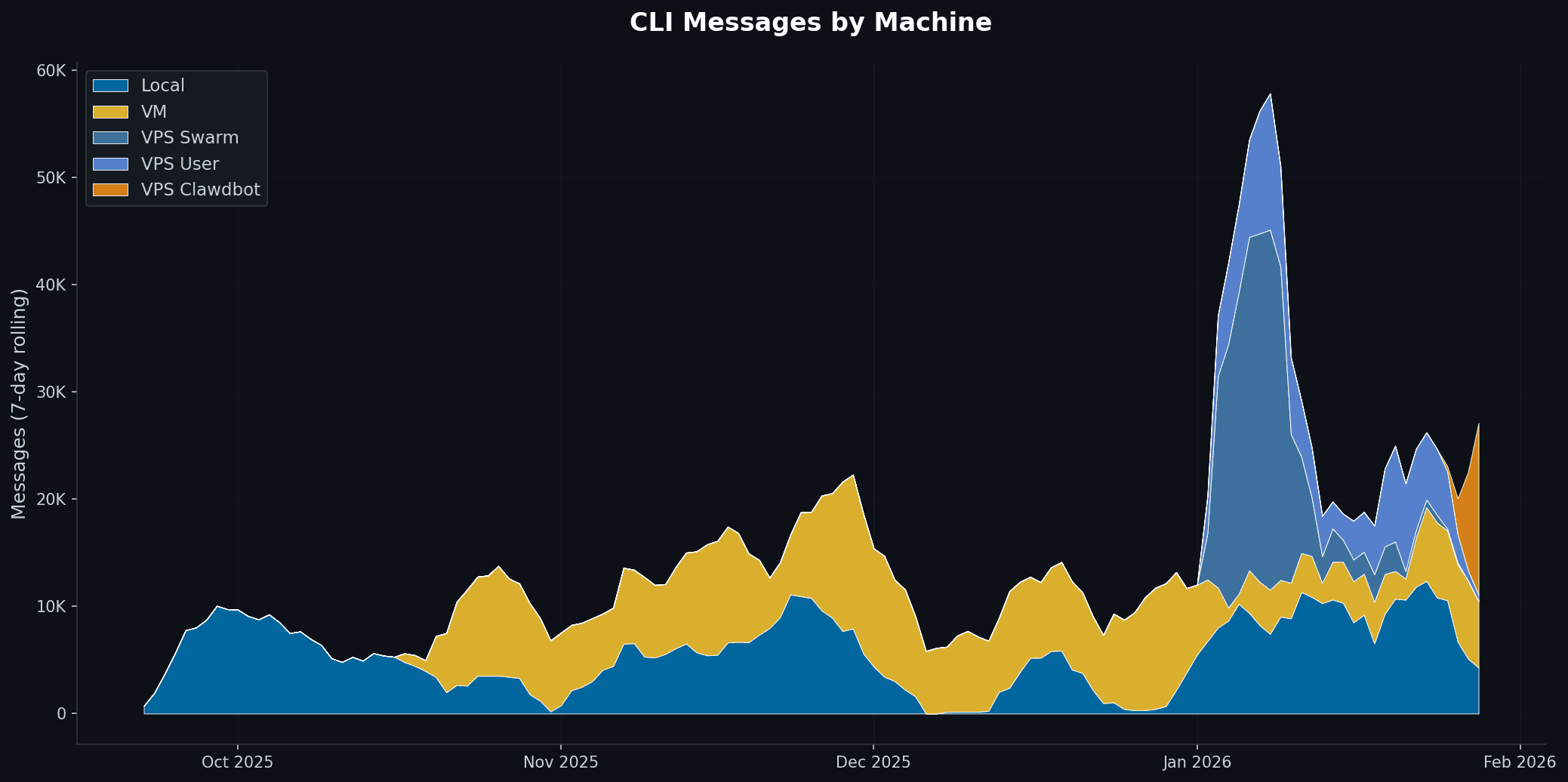
You can see that I have different use cases for different machine uses. And, in my line of work developing for multiple clients in different environments that will persist.
Same tooling. Same skills. Same MCP servers. Three completely different path structures.
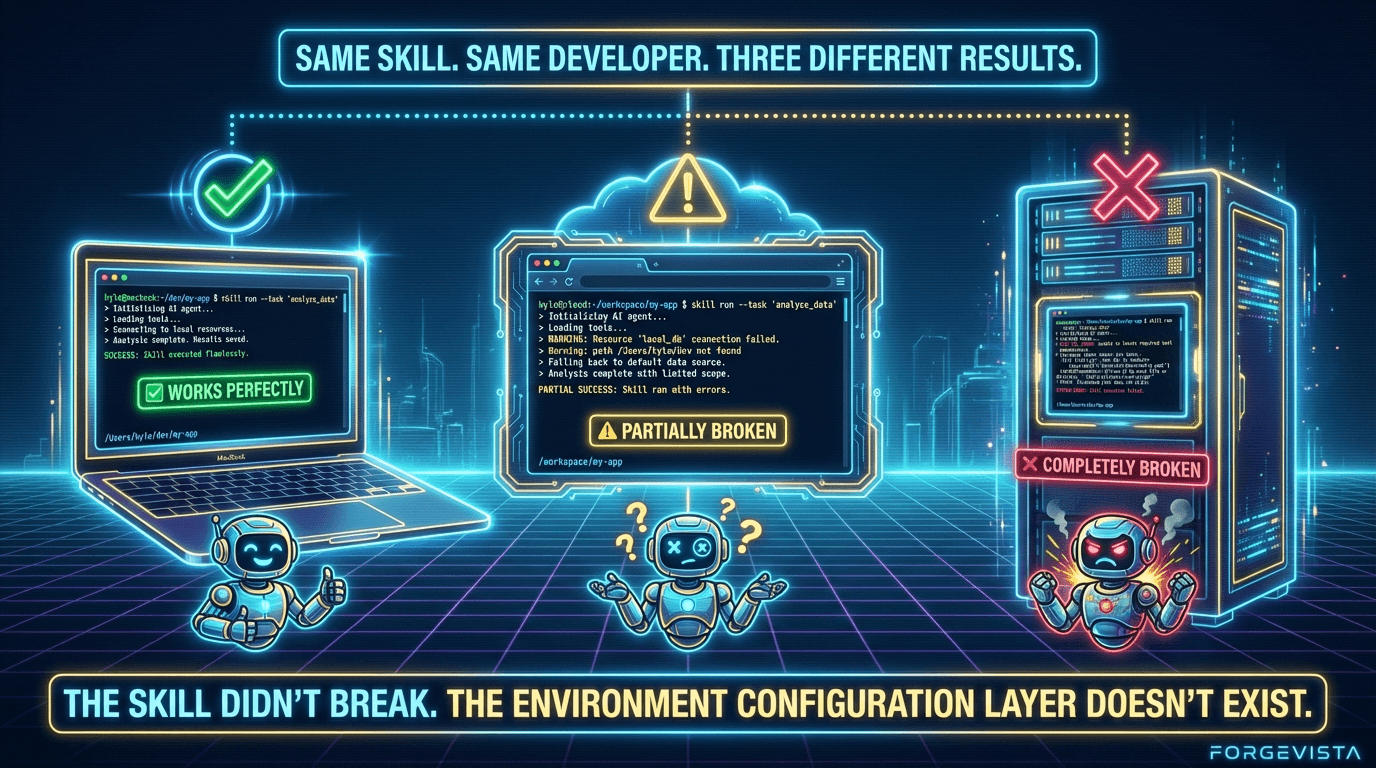
For months, I kept breaking things. A skill that worked perfectly on my laptop would fail on the VPS because it hardcoded a path to /Users/kevin/dev. An MCP server config that ran fine locally would crash on the cloud IDE because it expected a different directory structure.
The model harness didn't know where things were. And I kept forgetting to update configs when I switched contexts.
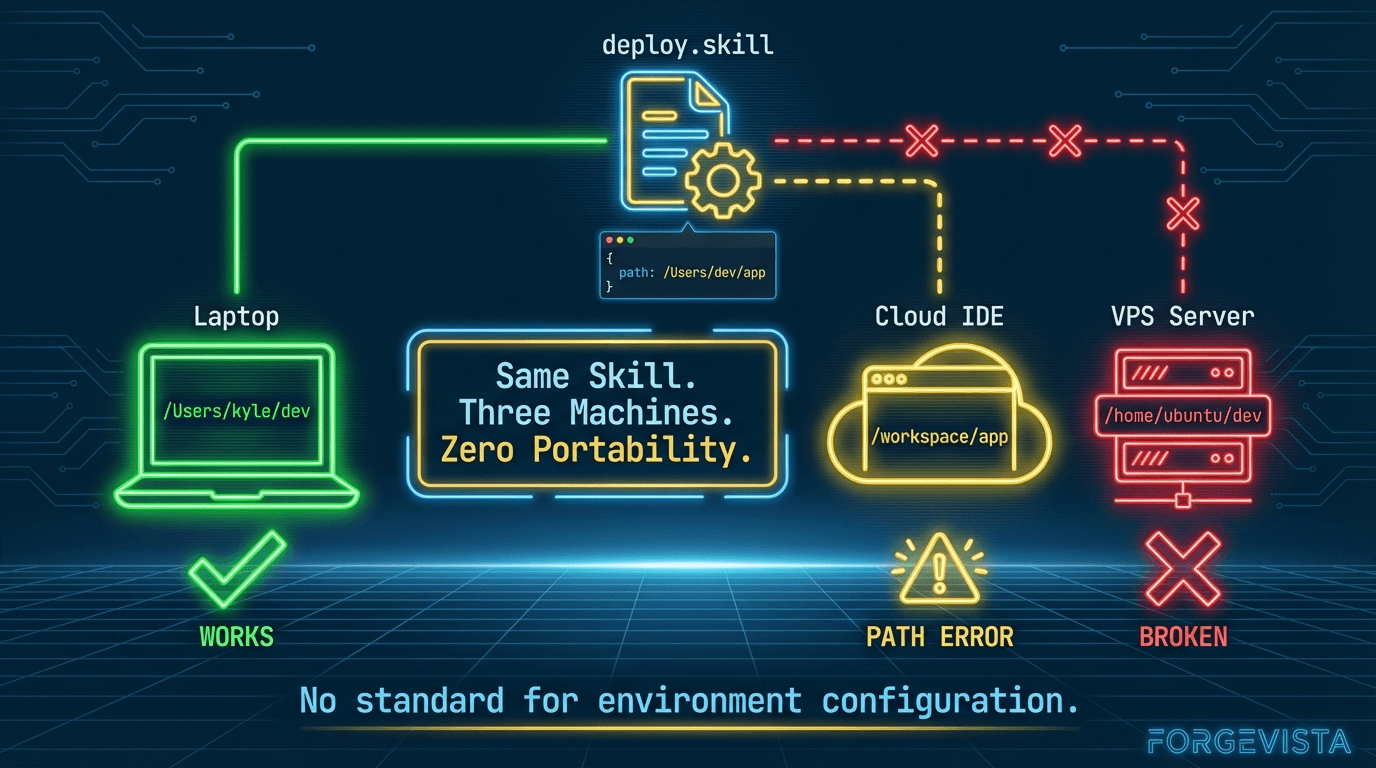
So I built something to start the journey to a fix.
The Bootstrap Problem: devcontainer.json
Before I get to my solution, let me acknowledge what already exists.
devcontainer.json is a specification — supported by VS Code, GitHub Codespaces, and several other tools — for defining development container configurations. It handles:
- Base Docker image specification
- Port forwarding
- Extension installation
- Environment variables
- Post-create commands
It's mature, well-documented, and widely adopted. If you're bootstrapping a containerized development environment, devcontainer.json is the standard.
But it doesn't solve my problem.
devcontainer.json tells a container how to set itself up. It doesn't tell agent tooling where things live on a specific machine after setup. It doesn't map project locations across environments. It doesn't handle the "same skill, different paths" problem I kept running into.
The Configuration Problem: hop.json
I looked for existing solutions. package.json handles node project configuration. pyproject.toml handles Python projects. But nothing handled the cross-environment, agent-specific configuration I needed.
So I created what I'm calling the HarnessOps spec (hop) — a single JSON file that tells every tool where things live on a specific machine.
https://github.com/hop-org/hop-spec
Here's the minimal version:
{
  "schema_version": "2.0",
  "machine": {
    "id": "my-laptop",
    "name": "MacBook Pro Development"
  }
}
That's it for basic machine identification. But hop supports much more:
{
  "schema_version": "2.0",
  "machine": {
    "id": "my-laptop",
    "name": "MacBook Pro Development",
    "type": "local-laptop",
    "agent_root": "/Users/kyle/dev",
    "os": "darwin",
    "arch": "arm64"
  },
  "projects": [
    {
      "name": "my-app",
      "path": "/Users/kyle/dev/my-app",
      "type": "tool",
      "beads": { "enabled": true },
      "basic_memory": { "enabled": true }
    }
  ],
  "accounts": {
    "github": [
      {
        "username": "kylerasmussen",
        "role": "primary",
        "default": true,
        "auth_method": "ssh"
      }
    ]
  }
}
The same project on my VPS:
{
  "schema_version": "2.0",
  "machine": {
    "id": "my-vps",
    "name": "Production VPS",
    "type": "cloud-vps",
    "agent_root": "/home/ubuntu/dev"
  },
  "projects": [
    {
      "name": "my-app",
      "path": "/home/ubuntu/dev/my-app",
      "type": "tool"
    }
  ]
}
Same project name. Different paths. My tooling can now ask "where is my-app?" and get the right answer for whatever machine I'm on.
What hop Solves
1. Machine Identity
Every machine gets a unique identifier and description. When I share a config or debug an issue, I know exactly which environment I'm talking about.
2. Project Location Mapping
Projects have consistent names across environments but machine-specific paths. My skills can reference my-app without hardcoding /Users/kyle/dev/my-app.
3. Account Configuration
Multiple GitHub accounts, different auth methods, organized in one place. My work account uses HTTPS with a PAT; my personal account uses SSH. hop tracks both.
4. Bundles for Context Switching
I can group projects into bundles:
{
  "bundles": [
    {
      "id": "client-work",
      "name": "Client Projects",
      "projects": ["client-api", "client-web"],
      "primary_project": "client-api"
    }
  ]
}
When I switch to a client context, my tooling knows which projects are relevant.
5. Integration Configuration
hop supports configuration for tools like BEADS (issue tracking), Basic Memory (knowledge management), and CLI activity logging. One file captures my entire agent environment configuration.
Is hop the Answer?
Honestly? I don't know.
I built hop because I needed something, and nothing else existed. It works for my use case. I've documented the spec, created a JSON schema, and started using it across my environments.
But I'm one developer with specific needs. Maybe the right answer is extending devcontainer.json. Maybe it's a new section in AGENT.md. Maybe someone else has already built something better and I just haven't found it.
What I do know is that this layer of configuration — the "where are things on this specific machine" layer — is missing from the stack. MCP tells agents how to talk to tools. Skills tell agents what to do. But neither tells agents where things live in a multi-environment setup.
If hop isn't the right answer, something else needs to fill that gap.
Secrets Management: The Unspoken Primitive
While I'm talking about environment configuration, let me address the elephant in the room: secrets.
API keys, database credentials, OAuth tokens — every agent setup needs them. And every developer has a different approach:
- Environment variables
.envfiles (hopefully gitignored)- System keychain
- Secrets managers (Bitwarden, 1Password, HashiCorp Vault)
hop doesn't store secrets directly — that would be a security disaster. But it does support references:
{
  "accounts": {
    "github": [
      {
        "username": "work-account",
        "auth_method": "https-pat",
        "pat_bws_id": "uuid-from-bitwarden-secrets"
      }
    ]
  }
}
The actual secret lives in a secrets manager. hop just knows where to look.
A real standardization effort for agent tooling should include a standard secrets interface. Not a standard secrets storage — use whatever manager you trust — but a standard way for tools to request and receive credentials.
Section 6: The Call to Arms
Here's where I'm supposed to wrap everything up with a neat bow and tell you exactly what to do.
I'm not going to do that.
What I've shared in this article is a perspective — my perspective, formed from building agent workflows across multiple environments, running into the same fragmentation problems repeatedly, and watching an ecosystem that has incredible potential get slowed down by unnecessary friction.
You might disagree with my framing. You might think standardization is premature. You might believe competition at every layer produces better outcomes.
But if any of this resonated, here's what I think matters.
The Core Insight
The model harnesses are good. Stop competing on primitives, start collaborating on protocols. FAST.
Claude Code CLI, Codex CLI, Gemini CLI — these are impressive tools. The teams building them are doing excellent work. The models underneath are increasingly capable.
What's slowing everyone down isn't the models or the harnesses. It's that every harness implements the same features differently. MCP servers, skills, hooks, instructions — the concepts exist everywhere, but the implementations fragment the ecosystem.
The faster we standardize, the faster we all move.
What MCP Proved
MCP is the existence proof.
Anthropic shipped it without waiting for perfect auth. Without a formal standards body. Without getting every competitor to agree upfront.
They shipped something reasonable, documented it well, iterated based on feedback, and let adoption validate the approach. Twelve months later: 97 million downloads, near-universal support, Linux Foundation governance.
That's the playbook.
For Toolmakers
If you're building model harnesses, agent tools, or ecosystem infrastructure:
- Pick a primitive that's fragmented. Hooks. Sub-agents. Commands. Instructions. Any of the pieces I outlined in Section 3.
- Propose a simple spec. Not perfect. Not comprehensive. Just workable. A JSON format. A file convention. A lifecycle definition.
- Ship it. Document it. Put it in a public repo. Write a blog post explaining your choices.
- Invite feedback. Don't defend the spec — improve it. The goal isn't being right on the first try. The goal is getting to something that works.
- Look for convergence. If someone else ships a competing spec that's better, adopt it. If yours gains traction, be a good steward.
The Skills protocol emerged this way. SKILL.md wasn't designed by committee — it was shipped, adopted, and refined through use. The spec that's now on agentskills.io works because it solved real problems for real developers.
For Developers
If you're building agent workflows, skills, MCP servers, or custom tooling:
- When something works, document it. Write a README. Create a template. Share the configuration that makes your setup work.
- Share your frustrations. The fragmentation problems I described aren't unique to me. If you're hitting the same walls, say so. Publicly. The toolmakers are listening — but they need to know what's actually causing friction.
- Try cross-platform. Build an MCP server that works across harnesses. Create a skill that's
SKILL.mdcompliant. Test your tools in multiple environments. - Support the emerging standards. If MCP works, use MCP. If
SKILL.mdworks, format your skills that way. Adoption validates approaches. The more people building on shared foundations, the faster those foundations solidify.
For Platform Providers
If you're at Anthropic, OpenAI, Google, Microsoft, or other major players:
- The marketplace layer is table stakes. VS Code's extension ecosystem didn't happen by accident. JetBrains' plugin marketplace didn't emerge spontaneously. Someone invested in the infrastructure.
- Cross-platform compatibility creates bigger markets. A tool that works only on Claude Code has a smaller addressable market than a tool that works everywhere. Bigger markets attract more investment. More investment produces better tools.
- 15% is the new benchmark. JetBrains proved sustainable marketplaces don't need 30% commissions. The regulatory pressure on Apple confirms the trend. If you build a marketplace, build one that developers actually want to participate in.
- Neutral governance matters. MCP's donation to AAIF was the right move. Standards that serve the ecosystem need to be owned by the ecosystem, not a single company.
The Speed of Standardization
I'll leave you with this observation:
Every month that primitives stay fragmented is a month where potential toolmakers build for a single platform, or build nothing at all. It's a month where someone's excellent MCP server doesn't work in Cursor. Where skills developed for Claude Code need rewriting for Codex CLI. Where developers spend time on compatibility shims instead of features.
The speed of standardization equals the speed of ecosystem growth.
MCP proved it can happen fast. Skills are proving it can emerge from practice. The momentum is there.
What's next is up to the people building this space. The toolmakers, the developers, the platform providers.
The missing protocols aren't missing because no one knows what they should be.
They're missing because someone needs to ship them.
What Do You Do Today?
If this resonated:
- Share your fragmentation stories. What doesn't work across harnesses? What should?
- Contribute to emerging specs. MCP has a spec repo. Skills has agentskills.io. These are living documents that improve with community input.
- Build cross-platform. Even if it's harder. Even if it takes longer. The ecosystem needs proof that cross-platform tools can work.
- Talk about marketplace economics. The monetization conversation is just starting. Developers building serious tooling need to be part of shaping what sustainable compensation looks like.
If you're building in this space — as a toolmaker, developer, or platform provider — I'd love to hear from you.
Find me on X at @selectstarkyle or check out ForgeVista where I'm documenting these workflows as I figure them out.
Next up: Back to all Perspectives
Also published on